Showing posts with label Internet. Show all posts

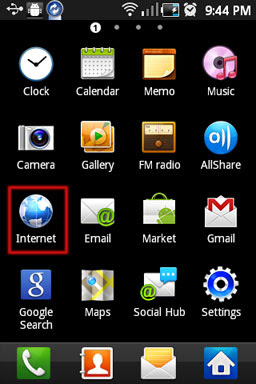
How to reset Android Internet settings

Written By technotheory on Monday, August 22, 2011 | 6:50 PM

If you are using an Android device and don’t know much about lots of tech side then this post will help you. When you browse a lot on your Android device at times your internet browser may become slow and little messy. The best option may be to reset your browser which set it back as you have used it for the first time. In this post I will explain how to reset your Android browser.

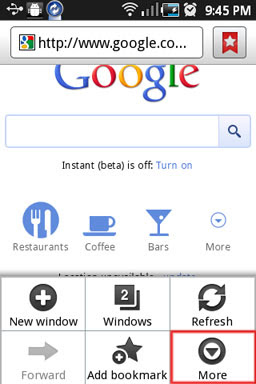
1. First you need to go inside/open your browser.


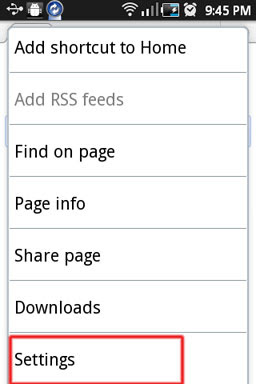
2. Now click the menu button on your phone which will display your browser options where you need to select More.


3. Now scroll down till you find Settings.


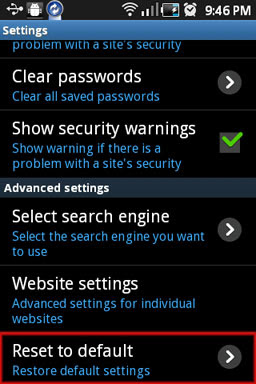
4. From the options scroll down till you find Reset to default.


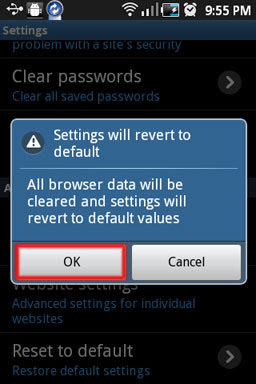
5. Tap on this which will ask you to confirm saying “Settings will revert to default values”, click OK to confirm and that it.


6:50 PM | 0 komentar | Read More

Google +1 button launches across the web

Written By technotheory on Thursday, June 2, 2011 | 7:01 AM

Some websites now plus-oneable - Google has announced that its +1 button will be proliferating across the web from today, landing on websites themselves rather than solely on Google.com search results.

The +1 button is a lot like the Facebook 'Like' button, allowing users to say "this is pretty cool" to their friends and contacts (Google's words, not ours).

Google has partnered with 11 big-traffic sites which will be the first to get the +1 button, including Rotten Tomatoes, Reuters, Best Buy, BloomBerg and the Washington Post.

The button will also start appearing on the Google-owned Android Market, YouTube and Blogger.

Another way to not use words

The extended +1 rollout comes hot on the heels of Twitter's launch of the Follow button for websites, meaning your friends will be in no doubt about whether or not you're a fan of a web page now as you 'Like' it, 'Follow' it and then '+1' it.

Google says that the +1 button should "make search results even more helpful and relevant" – which essentially means we'll all be helping Google sell more targeted advertising, as our own Gary Marshall points out.
7:01 AM | 0 komentar | Read More

Google Closes Newspaper Archive Project

Written By technotheory on Saturday, May 21, 2011 | 3:19 PM

Scanning all the news ever proves too strenuous - Google has shut its newspaper archive project down, after digitising around 2,000 titles.

The search engine had hoped to create a mass digital library of every article ever written, but Google has announced that it will not be processing any more files.

A spokesperson for Google said, "We work closely with newspaper partners on a number of initiatives, and as part of the Google News Archives digitization program we collaborated to make older newspapers accessible and searchable online.

"These have included publications like the London Advertiser in 1895, L'Ami du Lecteur at the turn of the century, and the Milwaukee Sentinel from 1910 to 1995."

Relevant

The statement continued, "Users can continue to search digitized newspapers at http://news.google.com/archivesearch, but we don't plan to introduce any further features or functionality to the Google News Archives and we are no longer accepting new microfilm or digital files for processing."

According to an email sent to newspaper partners, Google has drawn the curtains on the Google News Archives programme in order to concentrated on "newer projects that help the industry, such as Google One Pass, a platform that enables publishers to sell content and subscriptions directly from their own sites."
3:19 PM | 0 komentar | Read More

YouTube to add 3,000 Titles to Movie Rentals Service

Written By technotheory on Tuesday, May 10, 2011 | 6:20 AM

Sharing site will take on Netflix with exclusive bonus content - YouTube will begin adding 3,000 new movies to its US-only movie rentals service from today.

The Google-owned video sharing giant will try and lure viewers from the likes of Netflix, Sony and Apple by offering "behind-the-scenes movie extras" to accompany full-length movies.
https://blogger.googleusercontent.com/img/b/R29vZ2xl/AVvXsEj4kwBt5Fk3uXlS4xxHE-91pXcOKvbzvA3jrWs4Z6yWhVYdlt0ne8-X8eZLKeMRX4_ir6HXTKxNn0PX87Q5058hmLJECuIfsekPGLr6ZC3oHqzLFNfiv7j0GIpy4dZxEHzXT3JFSuVcp_Y/s1600/youtube.png
In a blog entitled "Welcome to the future of video," the company says it is also investing more money in producing original content through the YouTube partners scheme

"Today, we're going to start adding around 3,000 new movies available to users in the U.S. (more on this in a post later today) that will be accompa,nied by reviews and behind-the-scenes movie extras," YouTube says.

"Whether it's short movie trailers, funny movie parodies or full-length blockbuster films, we encourage you to sit back and settle in to the YouTube movies experience."

Massive audience
YouTube is yet to reveal which movies will come to the service (perhaps that will become clear in an update expected later today), but its clear that the company plans to use its massive audience to take on the giants of movie streaming.

There's still no word on whether the site plans to launch the service internationally. That will depend on how quickly it can make deals with the studios.

Update: YouTube will partner with studios Sony, Universal and Warner Brothers and films will be available to watch at YouTube.com/movies
6:20 AM | 3 komentar | Read More

Microsoft buys Skype for $8.5 billion

Pays for the company in cold, hard cash - Microsoft has officially acquired Skype for $8.5 billion, a deal which has been approved by the boards of directors of both Microsoft and Skype.

https://blogger.googleusercontent.com/img/b/R29vZ2xl/AVvXsEjricY9z2cJ-cNSaW58fsFp99vAmg_X6WhoRo_oAMmZTG-C3sg84-b85IzjX4CFL0oC3BKjWSV6nlQxEySxLYFxJLlan4XwnO9wTjmSk57TLZYczTg-6CKVuPdmKArK7C3cYrkVilcVt-E/s1600/skype.png

"Skype is a phenomenal service that is loved by millions of people around the world," said Microsoft CEO Steve Ballmer about the deal.

"Together we will create the future of real-time communications so people can easily stay connected to family, friends, clients and colleagues anywhere in the world."

ORIGINAL STORY

Microsoft has all-but sealed a deal to buy internet phone firm Skype, reportedly looking to pay $8 billion for the company.

Skype has been long sought after by many tech companies, with Google, Microsoft and Facebook all rumoured to be interested in buying the service but it seems that it is Ballmer and co. who have reached for the chequebook.

Although the deal is not yet official, the Wall Street Journal is reporting that it could be announced today – as long as negotiations go smoothly.

As part of the deal Microsoft is set to take on Skype's current debt, with the WSJ believing this will mean it will have to pay as much as $8.5 billion for the company.

Biggest ever buy

If the acquisition is successful then it will be the biggest ever for Microsoft, a company which has started to lose traction to the likes of Google.

Skype has been around since 2003 and is was bought by the folks behind eBay, who paid $2.5 billion for the web service back in 2005. It was then bought by private investors - who originally invested in Skype - in 2009 for around $2 billion.

In recent years Skype has found its way on to more and more products, including mobile phones and televisions.
6:08 AM | 0 komentar | Read More

Why Your Home Router is 192.168.1.1

Written By technotheory on Thursday, May 5, 2011 | 12:25 AM

These days, there is one piece of networking equipment that has become much more common: the router. Many of them actually have the same IP (Internet Protocol) number, 192.168.1.1, and for an interesting reason.

https://blogger.googleusercontent.com/img/b/R29vZ2xl/AVvXsEi9FCTyHUWfqA18_NxXnGaaoG650jGqG7FzgCnZ8EtaJTNhkQcOPQZRqEvqcRkiNNDtwthVxJZ0BOfNFYAZn6dFyb4uGbLD15cXTeRhgONJ4E15D6NSujYmYpCXvEzSpvKf1EdRdv1sceI/s1600/router-ip.jpg

Every website, router, and computer has an IP address. It is how computers uniquely identify themselves on a network or on the Internet. Typically, in a home network, your router assigns one to your computer. How does it make sure the IP address on your home computer is not the same as one on the Internet? There actually is a list of numbers that is reserved for private use (home, office, corporate, etc.). They are never used for a public website. While the details of how IP numbers are used is intricate, the ranges of reserved numbers are straight forward:

• 10.0.0.0 to 10.255.255.255
• 172.16.0.0 to 172.31.255.255
• 192.168.0.0 to 192.168.255.255

Notice how the last section starts with 192.168.0.0 and that looks a lot like the 192.168.1.1 router address. It may sound strange, but the 192.168.0.0 is actually used to refer to a group of computers. It is OK if that seems odd or does not seem to make sense. The important thing to recognize is that 192.168.1.1 was chosen because it is a low number in this special range. Your computer’s IP number, given to it by the router, will be similar. It should be something like 192.168.1.x (x is a number between 2 & 255).

The nice thing about this convention is that you can memorize this number one for many routers. It may work for every router you ever own. It also should work with the routers of family and friends. This is useful for configuring routers and trouble shooting networks.

Using the number, 192.168.1.1, is actually an easy way to configure your router. For most modern home routers you can just type it into your browser. A configuration page should come up. What it will look like will change from manufacturer to manufacturer. Some may require a username and router password to see anything, others will at least tell you if you are connected to the Internet or not. If you cannot connect to a few different sites, you may be able to check here to see if your Internet connection is down. (Once I typed it in and nothing came up: someone unplugged the router.) Be sure to read your router’s manual before changing any settings. You probably need to log-in to do any real damage, though.

Important note: If your router does not require a password to edit core settings, you have a serious security problem. Please contact your Internet Service Provider for help and instructions on how address that issue. Ghacks has a guide to secure your wireless router that you should take into consideration. It is very easy for someone to change the settings on your router if there is no password protecting in.

Do all routers use this number to identify themselves? No. Some routers will default to a different number. There is no rule or law stating that it has to be 192.168.1.1; it is just a convention. If you look on the bottom of your router, or its manual, you will usually find out what that number is. Typically it is a 192.168.x.x number, but 172.x.x.x or 10.x.x.x are possibilities too. It would be very strange for it to be something else. The IP number on your computer should still be similar to the router’s number (the number before the first decimal point has to be the same). (Sometimes routers displays domain names instead, like speedport.ip which they resolve internally to the IP, meaning you can enter both the IP or domain name to load the router configuration)

Some other common numbers are 192.168.0.1 (ex. D-Link & Netgear) and 192.168.2.1 (according to 19216811.net). While 192.168.1.1 is often mentioned as a Linksys convention, it is used by other brands such as Speedtouch. If you are using a router from an Internet Service Provider, it may actually be made by Linksys. Cisco uses 192.168.1.1 for some of its routers (such as those for small business), but that is no surprise as they own Linksys. Here is a list of some more examples.

One of the easiest ways to find out the IP address of your router is to open a command prompt (by pressing Ctrl-R, typing cmd and then the enter key) and enter the command ipconfig in it. Locate the Default Gateway entry, which in most cases is your router’s IP address.

https://blogger.googleusercontent.com/img/b/R29vZ2xl/AVvXsEhGj2rnOsEpJKoCc0LlwWcrP_hjDwJXHT2BvkT4mu5mNpymuD1VOEAqFhpUyo6ErCCWCpIV9M3JWLSkJjKkUHZDWiwhJhRAm90i9ku06aGALwSbhxXjInVJEaN7WeJcD3iI8eL3A4Q3anc/s1600/router-ip-address.png

12:25 AM | 0 komentar | Read More