Showing posts with label Android. Show all posts

Samsung Galaxy S WiFi 4.2 Android Media Player

Written By technotheory on Tuesday, February 28, 2012 | 4:10 AM

Samsung introduces its new Galaxy S WiFi 4.2, an Android media player intended to deliver powerful gaming on the go, joining the Galaxy S WiFi 3.6, 4.0 and 5.0 players. The new 4.2-inch PMP is powered by a 1GHz processor with 512MB of RAM. It features the SoundAlive audio system for enhanced gaming experience. It comes pre-loaded with Need For Speed Hot Pursuit game.

The Galaxy S WiFi 4.2 sports a 4.2-inch 480×800 IPS LCD touchscreen, a 2 Megapixel main camera, a VGA front camera for video call, support for Bluetooth 3.0 and WiFi 802.11b/g/n connectivity, and a microSD card slot for expansion. The player comes in 8GB or 16GB models. It runs Android 2.3 Gingerbread and is loaded with TouchWiz UI, Samsung Hub, ChatON app.

The Samsung Galaxy S WiFi 4.2 comes in white.

https://blogger.googleusercontent.com/img/b/R29vZ2xl/AVvXsEjBN0eLtUOEEjLEIzPN6DxPiv-K7XcCmPpWsjmU3vBgb-f5SLgrtM5WMXDHJnyftJNkkZ2Chj7eD-TAkMd0hd6Fn8gShNV22dCWQT-37utsROXRd4Sf6B3jA6a7jAwbRNJafcFETnyqRGw/s1600/Samsung-Galaxy-S-WiFi-4.2-Android-Media-Player.jpg
4:10 AM | 0 komentar | Read More

Samsung Galaxy Tab 2 10.1 announced

Written By technotheory on Sunday, February 26, 2012 | 12:50 AM

Samsung has decided to get in just before MWC 2012 kicks off and has unveiled the next in its second-generation tablet range: the Samsung Galaxy Tab 2 10.1.

Following on from the Tab 2 7.0, the new larger-screened device features the likes of Android 4.0 (Ice Cream Sandwich to you and me) a 1GHz dual core processor and a 3MP rear-facing camera.

A 7000mAh battery promises to keep you going through the day, and there's a VGA front-facing camera for video calling should the wind take you.


The same, but different…

However, Android ICS aside, there's not a lot that we can see to really call this an upgrade over the original 10.1 – and it's even thicker and fatter than the original to boot.

The Samsung Galaxy Tab 2 7.0 was a similar affair – an update to the latest version of Google's OS but not much of a difference in the way of specs.

We're hoping the fact we're seeing a re-badged model from last year means we'll be getting something of a price plunge too – given the first Tab 10.1 can be had for around £360 now, a sub-£300 tag would be just lovely. We have been given a Galaxy 2 10.1 UK release date of March, so not long to wait now.

We're going to be getting our mitts on this latest tablet very soon, so stay plugged into TechRadar if you can't wait for our hands on: Samsung Galaxy Tab 2 10.1 review. Especially for the number fans among you.
12:50 AM | 0 komentar | Read More

Acer Iconia Tab A200 Android 4.0 ICS Tablet

Written By technotheory on Saturday, February 25, 2012 | 12:32 AM

Acer Iconia Tab A200 is always the Android 4.0 Ice Cream Sandwich OTA update. The 10.1-inch tablet is powered by NVIDIA Tegra 2 1 GHz dual-core processor with 1 GB RAM or power. It comes with 8GB or 16GB internal memory for your applications, music and video store, and there is microSD / SDHC card slot for expansion cards.

https://blogger.googleusercontent.com/img/b/R29vZ2xl/AVvXsEjnqB9LrCgweyDHOzGlTbtwPuNOwr_Oxc1yiABCv65PqdI5zxnCgGWaLaZqBUPCdZFArMnIMqBbpIwnHB60726i5IIToxuI4aufOhFVv37-i26p6JQFaCWmskQ13nlrJ0R2rLNtBF-0GQw/s1600/Iconia-Tab-A200-Android-4.0.jpg

The Acer A200 tablet has a 10.1-inch WXGA 1280 × 800 touchscreen, a forward facing camera, two speakers, Bluetooth and WiFi connectivity. The Iconia Tab A200 is available in titanium gray and red metallic colors.
12:32 AM | 0 komentar | Read More

4 Most Wanted Tablet Operating System Hacks

Written By technotheory on Wednesday, December 21, 2011 | 2:00 PM

HP’s ending of support for their Touchpad tablets has sparked some creativity for many hackers, mainly with operating system compatibilities. People want to run Mac on PC, people want to run PC on Mac, and now more and more people are wanting to run different operating systems on tablet computers. Here are 4 of the best tutorials for running different OSs on tablets.

https://blogger.googleusercontent.com/img/b/R29vZ2xl/AVvXsEi3TaiQk-Ds1tY3WnpHUUL_VhqPN-rVGelgXhALida0nHeWqKcVNVtiHhocHLR3oRgbJ8F3GHAnGkvMdWFknSA1k1SsdS1l3fQPtsYI7C9xUQdnizyBqjpPFtlMqE_Skv_azgN_BNFDJ_E/s1600/Android-on-iPad.jpg

Android on HP Touchpad

Although the HP Touchpad quickly became the fastest selling tablet to date, the ending of support for Web OS by HP gave hopes to many HP Touchpad owners that the Android operating system could be ported to the Touchpad. After all, Android is a very popular mobile operating system, and with the lack of updates for the Touchpad’s native OS, Android may be a better choice.

Running Android on an HP Touchpad can be accomplished using a method that developers refer to as CyanogenMod7.

https://blogger.googleusercontent.com/img/b/R29vZ2xl/AVvXsEg6SzlOLoeJbNWdw7hjL0uJCVLpTAVf2uU-kfhyz_gpsBkvGe4xq4Fvax2V4aphfh0PJiKjjUtcP_1vquV8srwBCNVW_dWNN7YxZ07rfHmFAJU9NesnsTxYzLeA3dYQhjRCXbpaD6T02t4/s1600/HP-Touchpad-with-Android.jpg_thumb.png

Android on Amazon Kindle Fire

Although the Amazon Kindle Fire is still relatively new, developers have already found a way to install Android Tablet OS on the Kindle Fire. If you are a Kindle Fire owner that prefers the regular Android OS vs. the heavily Amazon branded OS that ships with the Fire, this might be a mod for you.

Running Android on the Amazon Kindle Fire can also be accomplished using CyanoGenMods.

https://blogger.googleusercontent.com/img/b/R29vZ2xl/AVvXsEg1STrYnBm55YabhP6_eMa6Mys5krmJjdjKQ3IuYTfgulNWi9fV1qHwwC0i2Tz4yNTgNhgXhQvMSrue0txOdm3Sc9xoApbA8UmEtWaH5M-4lCBN7LPwvp3js64KAYH6DY1ryGkPWkTCrPE/s1600/Amazon-Kindle-Fire.jpg

Android on iPad

Many iPad owners would probably agree that iOS, the iPad’s operating system, is pretty rad. With the iPad, you also get the Apple App Store, which has one of the widest selections of apps, out of all tablet manufacturers.

However, Android is more of an “open source” operating system, that is different from iOS in many ways. Both operating systems have their advantages and disadvantages, but if you are an Android fan but iPad owner, you can port Android to an iPad if you would rather run Android than iOS.

https://blogger.googleusercontent.com/img/b/R29vZ2xl/AVvXsEi3TaiQk-Ds1tY3WnpHUUL_VhqPN-rVGelgXhALida0nHeWqKcVNVtiHhocHLR3oRgbJ8F3GHAnGkvMdWFknSA1k1SsdS1l3fQPtsYI7C9xUQdnizyBqjpPFtlMqE_Skv_azgN_BNFDJ_E/s1600/Android-on-iPad.jpg

iOS on Android (Motorola Xoom)

Whenever you try and run Apple software on something that isn’t Apple, it’s a bit more difficult of a process. iOS hasn’t been stabile version installed on an Android Tablet as of yet, and as you may know, because there are so many different types of Android Tablets, rooting iOS to Android would be difficult, similar to creating a hackintosh computer.

However, there are some developers out there that are definitely making progress with the iOS on Android mod.

https://blogger.googleusercontent.com/img/b/R29vZ2xl/AVvXsEhp_TcwFXw_nBtAbOrANYAYnm0hUgn5QEz-DUtMEyuWVU-7rMbOaX1170MEvmJBNMKW75r8zN8TtpqOQip1rNZu11jbVKySNgKFR7DaZlGUcUIU1nPHGzPqm9C-H8KuUYfhaAyIVCCCf1w/s1600/iOS-and-Android.jpg

Conclusion

Overall, there isn’t a super simple way to run any tablet operating system on a different tablet. However, developers are pushing the envelope, and the above most wanted tablet operating system hacks are great examples of that.

One development idea that would be awesome, would to have something like VMware Fusion or Parallels for the iPad, which would let iPad owners run Android (or other operating systems) via virtual machines. Alternatively, it would be nice to have a VMware like software that you could install on Android Tablets to run iOS, although Apple would never allow it.

Has anyone successfully modded their tablets with a different operating system? If so, leave a comment to help others!

2:00 PM | 0 komentar | Read More

AT&T HTC Vivid LTE 4G Android Smartphone

Written By technotheory on Tuesday, November 8, 2011 | 11:22 PM

AT&T releases the HTC Vivid, one of the first AT&T 4G LTE-capable Android smartphone. Powered by a dual-core 1.2GHz processor, the Vivid 4G comes with 1GB of RAM and 16GB internal storage. It comes with a 4.5-inch large qHD 540×960 touchscreen, a 8 Megapixel camera with auto focus, dual LED flash, f/2.2, 28mm lens; a 1.3 Megapixel front-facing camera for video chat.

https://blogger.googleusercontent.com/img/b/R29vZ2xl/AVvXsEiOEop4Qb_FgO8wy1v2ejTMllGm1uknT3f_pTshFDVF7u0Rk1QyhRmJQEfgTy4mVbQEZcJSI3XRa-ACW2NPbi9hNNucAtguzdzA7-wPZXCpBO7RngxHYzWpro1XPShvimYhSd9R-v-_V7Q/s1600/ATT-HTC-Vivid-LTE-4G-Android-Smartphone-black.jpg

The Vivid, with its 8 Megapixel camera, is capable of 1080p Full HD video recording at 60fps, slow motion playback, and comes with on-device trimmer to optimize social media uploads and memory space. The phone runs Android 2.3.4 with HTC Sense user interface. It supports Bluetooth 3.0, GPS, WiFi 802.11b/g/n, DLNA, and provides HDMI output.

https://blogger.googleusercontent.com/img/b/R29vZ2xl/AVvXsEgNM3LEo6JEUWdb7R53wMaNs6HgirNgxmDAiCdPYi01aiy_uM3Llyq5RUmRWMPK1CAfHYA0eL0XkMb-lkXoy2okc4u3W4kkamxJve-MQ4t2QkYRT4-HC_tThf1BZwvDsogTetYHvtGEM1E/s1600/ATT-HTC-Vivid-LTE-4G-Android-Smartphone-white.jpg

The HTC Vivid 4G LTE phone is available for $199.99 with a 2-year contract

11:22 PM | 0 komentar | Read More

Samsung and Google unveil Galaxy Nexus with Android 4.0

Written By technotheory on Wednesday, October 19, 2011 | 3:18 PM

Samsung Electronics Co., Ltd, a leading mobile device provider, and Google announced GALAXY Nexus™, the world’s first smartphone running Android™ 4.0, Ice Cream Sandwich, the latest release of the Android platform. GALAXY Nexus features a 4.65” HD Super AMOLED display technology at 720p resolution and a 1.2GHz dual core processor.

https://blogger.googleusercontent.com/img/b/R29vZ2xl/AVvXsEjgXq7aspAx2sr4Mov8TmW9JvIj_BxaCl8BBXuJUWAnxzsK6z6WA6g41-zpBibqP9zW0JYT-0FzKAyhDlsqP_RKfyqF84RwdvX7TdMKgut_MJLAqTFzm7H64wbhCjHGlKxd5YH0OWuZacU/s1600/GalaxyNexus.jpg

“Samsung and Google have closely collaborated to push the mobile experience forward. We are pleased to deliver the best Android smartphone experience for customers with GALAXY Nexus. We will continue to move forward with Android to provide the compelling consumer experience in mobile world,” said JK Shin, President and Head of Samsung’s Mobile Communications Business.

“Ice Cream Sandwich demonstrates the Android platform’s continued innovation with one release that works on phones and tablets and everything in between. Features like Android Beam and Face Unlock show the innovative work our team is doing, and GALAXY Nexus showcases the power behind Ice Cream Sandwich,” said Andy Rubin, Senior Vice President of Mobile for Google.

The first smartphone to feature Android 4.0, Ice Cream Sandwich

Ice Cream Sandwich brings an entirely new look and feel to Android. It has a redesigned user interface with improved multi-tasking, notifications, Wi-Fi hotspot, NFC support and a full web browsing experience.GALAXY Nexus features software navigation buttons, a first for Android smartphones. The lock screen, home screen, phone app, and everything in between has been rethought and redesigned to make Android simple, beautiful, and useful.

Ice Cream Sandwich also features a new People app, which lets you, browse friends, family, and coworkers, see their photos in high-resolution, and check their latest status updates from Google+ and other social networks. GALAXY Nexus features a redesigned camera which introduces panorama mode, 1080p video capture, zero-shutter lag, and effects like silly faces and background replacement.

GALAXY Nexus is also connected to the cloud, keeping your email, contacts, and all other data synced across your devices. You have access to more than 300,000 apps and games from Android Market™, or, in certain countries, you can buy and read books, or rent movies and stream them instantly from your phone. In the U.S., you can also upload your music to the cloud with Music Beta by Google and listen anywhere, even when offline.

Ice Cream Sandwich introduces innovations such as Face Unlock which uses facial recognition to unlock your phone. Using NFC technology, Android Beam allows you to quickly share web pages, apps, and YouTube™ videos with your friends by simply tapping your phones together. You can even use fun effects while shooting video or video chatting with Google Talk™.

Google Experience

GALAXY Nexus is designed to provide a “pure Google,” experience, and with it, you will be the first to receive software upgrades and new applications as they become available. It also features a number of Google Mobile services, including: Android Market, Gmail™, Google Maps™ 5.0 with 3D maps and turn-by-turn navigation, Google Earth™, Movie Studio, YouTube™, syncing with Google Calendar™, and a redesigned Google+ app.

Best-in-class hardware meets the most advanced software

GALAXY Nexus is the first smartphone to feature a 4.65’’ display with a market-leading resolution of 720p (1280x720), ensuring you can enjoy GALAXY Nexus’ immersive entertainment capabilities and fast web browsing in superior clarity.

Succeeding the original Contour Display of Nexus S, GALAXY Nexus comes with a rounded shape that fits perfectly within your palm or to your face for phone calling. Hyper-skin backing on the battery cover improves the ergonomic feel of the device and makes the phone slip-resistant. At just 8.94mm thick, with a minimal 4.29mm bezel, GALAXY Nexus provides superb portability alongside an expansive screen.

GALAXY Nexus also features an ultra-fast 1.2GHz dual core processor, providing superior power and speed, ensuring you can take full advantage of GALAXY Nexus’ enhanced multitasking capabilities with ease, or enjoy the large, vivid display to its full capacity with high-definition gaming or video streaming. LTE or HSPA+ connectivity combined with a dual core processor delivers high-speed web browsing which ensures you always have the web at your fingertips, wherever you are.

GALAXY Nexus will be available in the U.S., Europe, and Asia beginning in November and gradually rolled out to other global markets.
3:18 PM | 0 komentar | Read More

LG Optimus Q2 QWERTY Android Smartphone

Written By technotheory on Monday, September 19, 2011 | 8:10 PM

https://blogger.googleusercontent.com/img/b/R29vZ2xl/AVvXsEgLRbICfREDOboHVjWm5prgATCgJNFOp24VjmqVeY3GEv9lHzSNdiCIMazL0odgwWPb7QOEgbaPktWrv_NUYrS8h9MZQBdibrKJiCtXPQyCTIbechmXukCDtV8h8pxlwQme7gbkWWxPElE/s1600/LG-Optimus-Q2-QWERTY-Android-Smartphone.jpg

LG's fleet of Optimus handsets got slightly larger yesterday, with the announcement of the Optimus Q2 -- a follow-up to that LU2300 QWERTY slider we saw last year. Powered by a 1.2GHz Tegra 2 processor, this forthcoming device runs on Android 2.3, boasts a spacious, four-inch, IPS-based LCD with 700 nits of brightness and features a five-megapixel rear camera, along with a VGA front-facing shooter. The Korean manufacturer added that the Q2 will be about a tenth of an inch thinner and 0.35 ounces lighter than its 3.5-inch predecessor, and that it will ship with a wider keyboard. LG is expected to launch the handset in South Korea next week, though pricing and plans for a wider release remain a mystery. Head past the break for the full, translated PR.

Press Release :

LG Electronics, thin and lightweight QWERTY smartphone dual-core

2011-09-19

LG Electronics the ease of use, further volunteer opening night performance design will showcase a full QWERTY smartphone.

LG Electronics LG from next weekend, to be released exclusively through yupeulreoseureul 'Optimus Q2' which caused a frenzy last year, a QWERTY smartphone 'Optimus Q' is the successor.

After changing the perception of a full QWERTY smartphone, and ease of follow-up model for the response from the spread of a highly reflecting consumer demand for the inconvenience of traditional QWERTY smartphone has greatly improved.

'Optimus Q2' 4-inch WVGA display with IPS-grade form of a horizontal slide, be doing a combination of the QWERTY keyboard, though, the entire thickness, 12.3mm, weight 147g thin and light.

In particular, compared to existing products thickness 2mm, weight 10g reduces the country's thinnest, lightest and most of the same family for sale, more spacious keyboard layout is easier to enter.

1.2 gigahertz (GHz) dual-core processor, the brightest of the existing 700 smartphone knit (nit, luminance units) of the IPS display, gingerbread and the operating system to mount the high performance is achieved.

Also, apply touch-sensitive front panel buttons, highlight the clean, elegant design and black / white, two species will be released.

In addition, up to 22 times faster compared to Bluetooth to implement the 'Wi-Fi Direct (Wi-Fi Direct)' support, authentication and ease of content sharing between devices, 5.0 megapixel camera and video call front camera, was mounted only.

LG Electronics nayoungbae MC (Mobile Communications) is responsible for Korea, "one step further with a full QWERTY smartphone QWERTY chulsihae 20-30 hit the preferred customer focus," said "as a distinctive design and performance of the predecessor, will lead the success story," he emphasized.
8:10 PM | 0 komentar | Read More

HTC Sensation XE with Beats Audio Announced

Written By technotheory on Saturday, September 17, 2011 | 8:46 PM

https://blogger.googleusercontent.com/img/b/R29vZ2xl/AVvXsEgWVeayEC8L5Z2AnLf-GR5H-RymstgCGrkBGEFBk7upO-tOZ7PAJiH9YdE5x4gcKyw-Ba46KEQpJ3j-Ya88Y6XqMheBNsGsV6OfZxyajIvuBj6XhGC01aKem5Dn_CkF9uqegFM6L2I5SSQ/s1600/HTC-Sensation-XE-with-Beats-Audio-1.jpg

As you may know, HTC has partnered with and invested in Beats Audio. Now, the cellphone maker announced its first phone with integrated Beats Audio, the HTC Sensation XE, an upgrade to the original Sensation. To offer a Beats Audio experience — a combination of software and hardware, the phone comes inbox with custom made Beats headsets, engineered to deliver extraordinary sound; and is pre-loaded with specially tuned software and user interface.

https://blogger.googleusercontent.com/img/b/R29vZ2xl/AVvXsEim30h39e7h3w3NH3s8Hzw4x79bqojvqW5PHIBm62CIZkBRPSPYN49t-mpI5iifnXigJsQZSlDypFa8eoeT87JkQiXkGPMP1oFo_MEav9MNH-D_5VroOLqfevFK7dYYtg267UxEzFK5q3A/s1600/HTC-Sensation-XE-with-Beats-Audio.jpg

The Sensation XE is powered by a 1.5GHz dual-core processor with 768MB of memory and 1GB usable internal storage. It features a 4.3-inch capacitive touchscreen with qHD (540 X 960) resolution, a 8 Megapixel camera with auto focus, dual LED flash and 1080p Full HD video recording, a front-facing VGA camera, built-in GPS support, Bluetooth and WiFi 802.11b/g/n connectivity as well as a microSD card slot for expansion. The Android device sports gyro sensor, G-sensor, digital compass, proximity sensor and ambient light sensor as well.

Running Android 2.3, the HTC Sensation XE includes HTC Sense UI and supports WIFi tethering. It supports quad-band GSM/EDGE and HSPA/WCDMA networks.
8:46 PM | 0 komentar | Read More

Verizon Motorola DROID BIONIC Released

Written By technotheory on Thursday, September 15, 2011 | 5:25 PM

After announced back in January, the DROID BIONIC has been back to Motorola’s lab for a redesign and hardware enhancement. Now, the phone is released and is available from Verizon Wireless for $299.99 with a new two-year customer agreement. The Android smartphone supports Verizon Wireless’ 4G LTE mobile network.


The DROID BIONIC is powered by a 1GHz dual-core processor with 1GB of RAM and runs Android 2.3.4 Gingerbread OS. It sports a 4.3-inch qHD touchscreen with scratch-resistant Corning Gorilla Glass with dual-layer anti-reflective coating, a 8 Megapixel auto focus camera with flash and 1080p video recording, a front-facing camera for video chat, HDMI output, Bluetooth and WiFi connectivity. It has 16GB onboard storage and comes with 16GB microSD card pre-installed.


The Motorola DROID BIONIC includes MOTOPRINT app to print via WiFi-enabled printers and is pre-loaded with Adobe Flash player. It is Business Ready with advanced security policies; resizable and scrollable email, calendar and task widgets; device and SD card encryption; and Citrix GotoMeeting and Citrix Receiver for Android. Like the Atrix 4G, the new BIONIC includes the Webtop application, allowing it to beam a full-featured Firefox Web browser 4.0, email or documents to a TV or monitor, like the separately purchased Lapdock with a 11.6″ screen, keyboard and integrated trackpad.


5:25 PM | 0 komentar | Read More

How to Activate GPS on Android

Written By technotheory on Thursday, September 1, 2011 | 2:46 AM

Location based services can become a large battery drain when left running in the background. That’s why Android offers specific controls for the GPS chip in every device. There are even custom widgets that allow you to turn on or off the GPS satellite location right from the home screen. In daily use, it’s good battery practice to leave GPS satellite location off until needed for Google Maps or navigation apps.

To adjust the GPS settings, start by pressing the Home button to return to the main home screen.

Tap the Menu button on your Android device to bring up the contextual menu for home screens. Select Settings from the menu.

Scroll down the various list of Settings and find Location. Tap on its name next to the blue compass.

Here you have two options to adjust GPS settings. Toggling wireless networks will either allow or deny your phone the ability to use cellular towers or wifi networks to try and determine its location. This method is not a huge battery drain.

Tap the check box next to GPS Satellites to turn on the GPS chip. This method is far more accurate but will drain the battery if left on.
2:46 AM | 0 komentar | Read More

How to reset Android Internet settings

Written By technotheory on Monday, August 22, 2011 | 6:50 PM

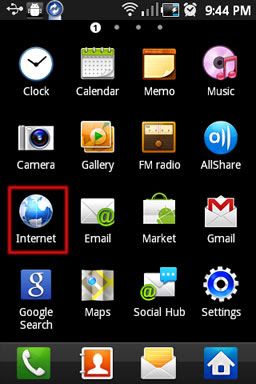
If you are using an Android device and don’t know much about lots of tech side then this post will help you. When you browse a lot on your Android device at times your internet browser may become slow and little messy. The best option may be to reset your browser which set it back as you have used it for the first time. In this post I will explain how to reset your Android browser.

1. First you need to go inside/open your browser.


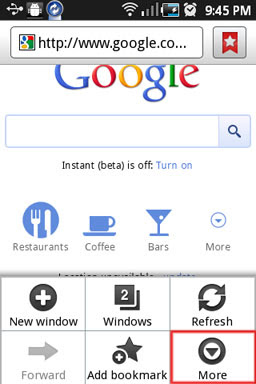
2. Now click the menu button on your phone which will display your browser options where you need to select More.


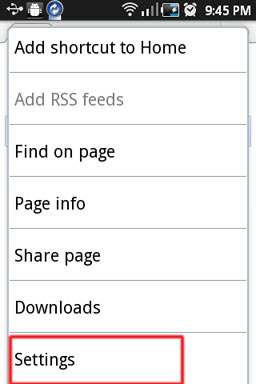
3. Now scroll down till you find Settings.


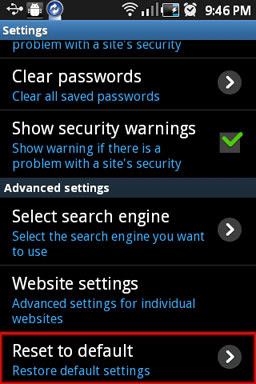
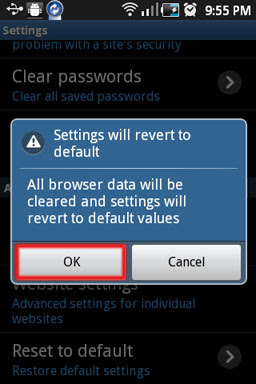
4. From the options scroll down till you find Reset to default.


5. Tap on this which will ask you to confirm saying “Settings will revert to default values”, click OK to confirm and that it.


6:50 PM | 0 komentar | Read More

Android x86 2.2 released, run Android on your PC

Written By technotheory on Sunday, July 3, 2011 | 9:14 PM

We all know how popular Android is on the smart phones and tabs. But when it comes to Pc’s there is very little number of people who might have used it. Well if you are impressed with Android you can then try it out right inside your pc. Android has released its Android x86 2.2 version (Froyo-x86) which can be used to run it on x86 machines (normal desktops and laptops). It’s a great opportunity for users around the world to try Android right inside the pc and become comfortable with this open operating system. The greatest advantage of this release that it’s a live, which means that you can run it without installing the operating system. This means that we don’t have to worry about our Windows operating system on the machine since it’s untouched.

This release fixes many bugs says Android, Kernel updated to 2.6.38 version with more drivers and bug fix, 4 times faster performance with OpenGL hardware acceleration improvement, multi touch option added and built in wallpapers.

Android also requests users/testers to report the issues they find when using Android so that these issues can be rectified in future releases.

You can download and learn more: Android x86 2.2 (Froyo-x86 version) live.

9:14 PM | 0 komentar | Read More

Google Video tested on Nexus S, coming soon to an Android phone near you?

During Google I/O, the Mountain View based company brought out Google Video, an online movie rental service. At the time, Google Voice was made available for the Motorola XOOM with Google saying that other devices would receive the service in a matter of weeks, which would take us to the beginning of July.

And sure enough, right on time, the other day Google Video made a fleeting appearance in the Android Market and some eagle eyed observers quickly downloaded the software on to their phones even though it was not yet in working order. Despite that itsy bitsy little fact, this is obviously a good sign for Android users looking for an alternative to Netflix and Blockbuster. After all, who knows the Android platform better, and makes Android apps better than Google?

The UI has a bit of a resemblance to the YouTube client on Android phones, and seems responsive and up to the task at hand. One person with the Acer Iconia A500 updated his tablet to Honycomb 3.1 and installed the app which is running without a problem. While we haven't a clue which Android phones will get first crack at Google Video, it does seem that the video rental service is coming soon to an Android handset near you.


4:04 AM | 0 komentar | Read More

Google+ Android app in the Market

Written By technotheory on Tuesday, June 28, 2011 | 11:53 PM

Google has unveiled their new social layer today, and it is called Google+. The trouble is that it is only open to a select few invitees, and those of us who have been invited are not yet allowed to write about the product in detail. That said, if you are a lucky invitee, be sure to grab the new Google+ app from the Android Market.

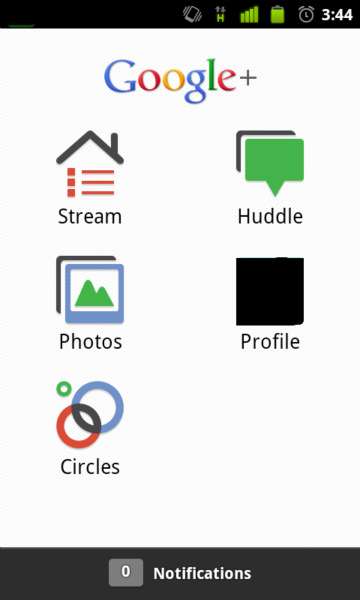
The app includes the basic features of the service including Circles (how you choose who you share things with), Stream (shared items), Instant Upload and Huddle. Those last two are the really interesting features. Instant Upload does exactly what it says and automatically uploads photos and video from your Android device, so you can easily share them with others. And, Huddle is the fabled group messaging system that we have all been waiting for. Huddle looks to only be available on Android and not on the web right now.

https://blogger.googleusercontent.com/img/b/R29vZ2xl/AVvXsEiu1wldtCbs4Z2OPwbaFrKavoapmEYT9CYVO-zM92os_PlkAzQPeUedoN-M26pa3OQVpxgAPvkbxf8dMCLMe0J9iHdEUHv6mL6qrQB7IwEFRq9lseljWjBRikZo-jc1x2hgmSJ3PiEDyCM/s1600/google+android+applications.jpg

Google+ is looking sweet, and we'll tell you more as soon as we can. If you have an invite, be sure to grab the app from the Market. But, if you haven't been invited, don't grab the app because it is useless without a login.

11:53 PM | 0 komentar | Read More

Manage and Control Android Smartphone from PC

Written By technotheory on Friday, June 24, 2011 | 12:59 PM

Android smartphones and tabs are gaining popularity each and every day, so is the when it comes to Android apps. In this post I will explain about one such app which can make our life easier.

https://blogger.googleusercontent.com/img/b/R29vZ2xl/AVvXsEiIsaxBAG3dQxxZ8B8Cf5bvsxrxHN2hPVR5gnh3NKCRQo86_EpSagM9ABettxarxGAbjPytPO56LAtvGBBkHa8WgTRvZXFBpOp_ex8mRZtOtGsgXHliTQNDSZh3yapTqPg5zXRJ0c1sFwQ/s1600/mobile-desktop-android.jpg

Remote Web Desktop one such app, with this app you can access and manage your Android phone/device from your pc like a remote desktop connection. Some features and functionalities of this app are as follows.

  1. Send and receive SMS/message right inside your pc.
  2. FTP Explorer to transfer files.
  3. Use your smartphone cam as system cam /or access your phone cam from PC.
  4. Screens capture option.
  5. Add /view wallpapers and media from PC inside PC to your phone, also save wallpapers and media into pc.
  6. Check the complete list of Files inside your device with File explorer.

Remote Web Desktop uses secure protocol to connect to your pc, all you have to need to have is a Wi-Fi connection and no installation is required on the pc to use this.

See the below video for more info.


You can grab this app here: Remote Web Desktop App. (Free and pro version available)

12:59 PM | 0 komentar | Read More

7 Tips for Going Green with Your Android

Written By technotheory on Thursday, June 23, 2011 | 8:24 PM

As a society, we’re more environmentally aware than ever before, and we know now that in order to be successful, we need everyone to play a positive role in “going green.” One way that we can all make an impact is by being more aware about our mobile phones, and the effect that they are having on our environment. It might shock and horrify you to know that, according to EPA estimates, the US alone adds more than 2 tons of highly toxic electronic waste to its landfills each year. We can all make a big difference by considering these tips for going green with your Android.


1. SIM Only Deals

When our contract expires, our current Smartphone usually goes to the trash. Either we put it there, or we turn it in, and the vendor puts it there. We can make a big difference by keeping our mobiles longer. The most cost-effective way to do this is through SIM only contracts, which most of the large carriers provide, but do not necessarily push.

2. Recycle, Donate or Sell

Instead of discarding your old mobile phone, mail it to or drop it off at a recycling center that properly handles electronic equipment. In fact, many mobile phone recyclers actually pay you, and while it’s not a great amount, it’s something, and it helps the environment. In addition, many charitable organizations now accept mobile phones as donations, which they use internally, or distribute to soldiers and people who cannot afford to buy them.

3. Think Green When Choosing a Mobile

Not all mobiles are the same, and some have much larger carbon footprints than others do. Reduce your own carbon footprint by opting for the phone that uses the least amount of energy possible to meet your needs. Some carriers will offer more power free, especially if you’re a loyal customer, but don’t accept it unless you’ll actually use it.

4. Use Your Wallet to Vote Green

When buying green, it’s not just about choosing the mobile that uses the least amount of power. Take a hard look at the vendors, the carriers and the mobile phone manufacturers. If you reward those with the better ecological track records by giving them your business, then you help ensure more companies behave that way in the future.

5. Reduce Power Usage

When it comes to our cell phones, most of us waste power without even realizing we’re doing it. A big culprit is too-bright screens. They come this way. Most of those don’t need it that bright, but we never think to change it. Small changes like this can have a dramatic effect over the years, especially if everyone is doing his or her part.

6. Use Power-saving Apps

If your battery provides enough charge for your entire day, then battery/power-saving apps might not seem like a big deal to you. But the power they save adds up. Consider all the power you could have saved over the course of the last decade, and now imagine if everyone who uses a mobile phone was using a power-saving app too.

7. Leverage Other Green Apps

The software available today is amazing, and it is even more astounding when you consider that we can have it in the palm of our hand or on our dashboard. For instance, apps like Ecorio use GPS to track your carbon footprint while travelling. You can compare yourself to others in your region, and then use that info to reduce your footprint.

Do you suggest any other tips to the list? Let us know in the comments.
8:24 PM | 0 komentar | Read More

14 best Android tablets in the world

Written By technotheory on Monday, June 20, 2011 | 1:06 PM

If you're looking for a tablet and don't fancy an iPad, then Android is the way to go.

There are other options out there; Windows 7 tablets are available, the BlackBerry PlayBook is on sale now and the HP TouchPad is coming soon. But Android 3.0 is currently the main OS rival to the iPad, and the products are creeping onto the shelves one by one.

We've gone from zero Android tablets to stacks of the things in a very short space of time, and inevitably some are better than others.

Some have ten-inch screens, others seven, and there are big differences in battery life, processing power and on-board RAM. So which tablets are the most tempting? Let's find out.

https://blogger.googleusercontent.com/img/b/R29vZ2xl/AVvXsEikNJsGyc_gDlKOItSFPxXkxFl14lv5p__xP9STTOrZeVJBslwKMSg1hsZ0QvFawxKAEjzoXEuWWo7PezKZtO2Ve9CZK8ML4R9orYoFQvcUHQYRgcuXPOBUbCP5tM8a_KAopVt9EBtRtAE/s1600/1+Asus+Eee+Pad+Transformer.jpg

1. Asus Eee Pad Transformer
Best Android tablet for: replacing your netbook

We love the Asus Eee Pad Transformer. In our opinion, it's the most compelling Android tablet we've yet seen. Not only is it powerful and well featured, it's designed to work with a keyboard dock which turns it into a fully-fledged Android-powered netbook. What's more, it costs just £429 on launch, with the keyboard - £379 without. This is the way it's supposed to be. This is the tablet that changes the game. Look out also for the Asus Eee Pad Slider which comes packing a slide-out keyboard - it's coming soon and promises great things!

https://blogger.googleusercontent.com/img/b/R29vZ2xl/AVvXsEhY4jHUEAKdelwOblR8ufP8zs_G8ImEhFKeM3xM2WQFT6tkv4AlxSiLB9qG8eiJYAf9nuwf-IKyo6o7czQgJXKYne3M7iDAQ3KOQQhQQruHJcBty3N0KmR_NVMGoIfwYPvBqvoYf_gqC1M/s1600/2+Samsung+Galaxy.jpg

2. Samsung Galaxy Tab 10.1
Best Android tablet for: the out-and-out tablet experience

While the Transformer offers something a little different at an unbeatable price, the Galaxy Tab 10.1 (not to be confused with the Galaxy Tab 10.1V - see below) offers a direct alternative to Apple's iPad 2. Sporting the Tegra 2 dual-core platform, it's both thinner and lighter than the iPad 2. This is some achievement, especially when you consider the fuss Apple made about how thin and light the iPad 2 was on launch. If you want an iPad-like tablet that's not an iPad, this is the one. The only caveat at the moment is that we don't know how much it's going to cost when it goes on sale in the UK... if Samsung can match the prices of its closest rivals, this will be the tablet to beat.

https://blogger.googleusercontent.com/img/b/R29vZ2xl/AVvXsEiPZTOE3EFGzUDAHFFr8WrsUyUF4477OyKv0393OwKp_HCj33zmptg791hD-CpskpGk6O3VZn1ZvntNZVSR_CGJ8nYwxZuQydnINFytVIgf01thP-JmgELRlT221qVJf0gjFXFfgf-uZi8/s1600/3+motorola+xoom.jpg

3. Motorola Xoom
Best Android tablet for: sleek good looks and solid performance

The Motorola Xoom was the first Honeycomb tablet to hit the shelves, and while it's a lovely piece of kit, there's a snag. It's just a little too expensive. Current prices are floating around the £459 which is simply too high when you've got the Transformer available keyboard-free for £379. In all other respects, this is a tablet that's worthy of your attention. Solid build quality, decent battery life, good performance. If the price drops by another £50, this could become the iPad rival Motorola wants it to be.

https://blogger.googleusercontent.com/img/b/R29vZ2xl/AVvXsEjWdan1wSI2Rd2lKJxzJ4T7ElibA06vqdf0IOrVv30yvGJ6lwv6EKuwA0RPyTE-ubUZcuNSNVrrqSz3crasJCkmxDi_4ySugtDsiBhmxmg2vGPIEz9g8wqsaecXKGju-v-frhrw-Qau_KA/s1600/4+LG+optimus+Pad.jpg

4. LG Optimus Pad
Best Android tablet for: Playing around with 3D

The consumer electronics giants are throwing everything at 3D, and LG has decided that its first Android tablet should play a role in its '3D is the best' hearts and minds mission. The tablet has dual-5MP cameras which work together to shoot 3D images and record 3D footage. Cool, huh? The problem is that there's no 3D screen, so if you want to watch your 3D movies you'll need to either plug the tablet into a 3D TV or watch in anaglyph 3D on the tablet's screen. If you're crazy about 3D, this is your next Android tablet.

https://blogger.googleusercontent.com/img/b/R29vZ2xl/AVvXsEhfRLmpl3B8seDwT64MFX5c3aTL6HwGih9-ka8e4xu5xRhCwIuqYrsrPhiXV8tqtZgIfr9g-VBDvTGHlqLiEIh13Gp3LwdDzoNT3DzeD25SMyGV2k4Rz8kHp1XcnngYjCF_5R-IQI5v7Ec/s1600/5+Acer+Iconia.jpg

5. Acer Iconia Tab A500
Best Android tablet for: fans of brushed aluminium bodywork

Acer's Android tablet is good looking and offers similar performance to the other Android 3.0 tablets on show here. We like it, but it's missing a bit of sparkle and there's not much on show here that we can cling on to. It's not as stylish as the Galaxy Tab 10.1, and doesn't offer anything different like the Transformer does with its keyboard.

https://blogger.googleusercontent.com/img/b/R29vZ2xl/AVvXsEgB2y6n9rDl5HNruFh-jJsBZ3w1_50AqoTB-2IXgnPg2c1zInrzbdj8ZPHu2KER5EDdueV-HaF-3f-V1bBNB9JQPzLKJtxCnWcSLeydeUuoAM6ybsgL3lRefquGZyUqR88Qmn27ipELXbU/s1600/6+Samsung+Galaxy.jpg

6. Samsung Galaxy Tab 10.1V
Best Android tablet for: taking 8MP photographs

The Galaxy Tab 10.1V's key selling point is its 8MP rear-facing camera. It's the best cameratablet (did we just make up a word?) yet and frankly makes a mockery of the 0.7MP camera that the iPad 2's of this world are rocking. It's a snazzy tablet then, lightweight, powerful and a joy to use. It's due to come out very soon, but at the moment we're not 100% sure when or how much it's going to cost. If the price is under £450, this could be a winner.

UPDATE: Samsung and Vodafone have both decided they will not be selling this device in the UK. It is to be replaced by the newer Samsung Galaxy Tab 10.1

https://blogger.googleusercontent.com/img/b/R29vZ2xl/AVvXsEgcUtJD3f8OqWveqFljAht1ruj0in5m7V89Ewz492BANyhV-l7wswE_cc9iJIFxbm1yuJXT19pdLf9muapFdDYX2ucBrIJ2BEK-V521d-pD4haxB-zyxPx4IbZYmaCKPcXY4_1F9IKroTs/s1600/7+HTC+flyer.jpg

7. HTC Flyer
Best Android tablet for: Portability and fans of Sense UI

HTC has decided to release the tablet running on Android Gingerbread, which will upset some purists that believe these tablets should run on Honeycomb. However, the HTC Sense overlay deals with that, offering a new range of widgets and content to mask the fact it's running older versions of the OS (although a Honeycomb update is imminent). The new tablet has a 7-inch LCD screen, and comes with an aluminium unibody shell that feels very nice in the hand. However, with a price of nearly £600, can this tablet compete?

https://blogger.googleusercontent.com/img/b/R29vZ2xl/AVvXsEh8W7I-8IkdFRUj2H87rUvcIfaE1HFiXWaFxYGMtvqmQbOvxfCJUyL1JsuNgRnYDJzO2ukZxt6sskkjAfxgSwpvuLt1goF3Iu76SWe6-WZHfWON5yvtoPQUbuKl7du5lvlfTD-wUWMrN88/s1600/8+Samsung+Galaxy+Tab.jpg

8. Samsung Galaxy Tab
The original iPad rival - does the Galaxy Tab still have something to offer?

Samsung's original 7-inch Galaxy Tab is looking a bit old and tired now, and we weren't big fans of it when it was brand new anyway. However, with heavy discounts, this tablet is now available for under £300 and there are plenty of attractive 3G package deals available. There's no Android 3.0 here though, which makes this Tab little more than a smartphone on steroids.

https://blogger.googleusercontent.com/img/b/R29vZ2xl/AVvXsEgqiAfqy81ujVpbrSjEY4KwZa3eLqhDSJkBLFE4hyX3Ho0cwHG5j_s_EAqMdVcL8zq09XAGVOw7QO0Dy55S_18enxbOpNNhkWLABiBzrHuFoM5edRjIKL2sFytXDVm-Xp2mXM0yrtAUyKE/s1600/9+ViewSonic+Viewpad.jpg

9. Viewsonic Viewpad 7
A decent Android 2.2 tablet but it's already out of date

The Viewsonic Viewpad 7 is exactly the same, albeit slightly more expensive than the Linx Commtiva N700 - and confusingly, Viewsonic is marketing it as a smartphone. It's a terrible smartphone but it's a fairly competent 7-inch Android tablet: its 600MHz processor isn't really fast enough for Flash though, not to mention recent Android releases.

https://blogger.googleusercontent.com/img/b/R29vZ2xl/AVvXsEg58PQZggm-B9GyyjhyphenhyphenkyGbH2jiR1EdkfL0kMZLiiGFGoKjSnZmNBBAnoNuhjJ2DD5VYtlnPwWFNTwk1MBOmFlevUd0euyWWtUR4HqQQgERABt2Lyj6xZRg2oyNh1qRal43uSYZfQi_HvI/s1600/10+Creative+Ziio.jpg

10. Creative Ziio
Resistive screen and Android 2.1 meets bargain retail price

The Creative Ziio 7-inch tablet runs long out-of-date Android 2.1 and has no access to the Android Market. However, it's a decent media tablet, designed to stream music to wireless speakers and it's available for under £200. Depending on your needs, this tablet has a chance of being the one.

https://blogger.googleusercontent.com/img/b/R29vZ2xl/AVvXsEiF1M69XsXnHaKiZPNlzBdSVFJBNkUrRuWY6ffei103P5KZGZyi5xaL0OkQDVsP9VJ9BvNnCCPzXLCn0wK1_l8NwR4tZy0vxJT-DeCmz_zjYGuYPQYgA0GDPg3-bcXqvoaEiX5gB5U_kCs/s1600/11+Viewsonic+viewpad+10s.jpg

11. Viewsonic Viewpad 10s
A step too far for Viewsonic's weakling Android tablet

We called the original Viewpad 10 a stinker, so what about its successor? It runs Android 2.2 with its own Tap UI overlay, there's a 1GHz processor inside, and there's a very useful option to give each family member their own account. We wish the iPad had that. The 10s is a vast improvement over its predecessor, although it just can't compete with the products higher up in this list.

https://blogger.googleusercontent.com/img/b/R29vZ2xl/AVvXsEiZv_z1EVMKQKOa8pdBBw1G2B6M9WFK4OKaEcBA376lgmck_vd39GqHqpAlv-re5FLFpxzj2A42u2eJwW0A3KceSR8N7TEzy27zbBkp2jmLvIC0b_F0PFWMDJcDnMIxHb5BGeKBvPCKXUk/s1600/12+Hannspree+hannspad.jpg

12. Hannspree Hannspad
Another Android tablet bereft of the Android Market

This tablet has more in common with Samsung's current tablet offering, the seven-inch Galaxy Tab, than the new boys when it comes to software. However, it's a match for them when it comes to hardware grunt. The problem is that it's let down by the absence of Android 3.0 and the Android Market, an unresponsive touchscreen, poor viewing angles and some shoddy optimisations.

https://blogger.googleusercontent.com/img/b/R29vZ2xl/AVvXsEh8cZAxp-kJtqgD7qIAUMq9kNQ4K5pEsIZB7z6m3p-v1Twqdc_HKWXq-ks9NigJ1PviDyldoHO-GfmWprFnNkI6ksSICo45vhoUpCY7jBOhzv6rVgDojfkic5ZU2RGMFXHMRSOIULHqtms/s1600/13+Notion+Ink+Adam.jpg

13. Notion Ink Adam
The Android tablet that promised so much

Notion Ink's take on the Android tablet was different and exciting in equal measure. Offering a heavily modified Android OS, the tablet was supposed to be able to run apps onscreen side-by-side, it was supposed to have a screen that was readable in bright sunlight, it was supposed to be able to host external devices like cameras. But it doesn't look like many of these pipedreams have been woven into anything even resembling reality. At this point, it's unclear whether we'll ever even see one in the UK.

https://blogger.googleusercontent.com/img/b/R29vZ2xl/AVvXsEjVQT7aNhzPwj9EPtCBYf1GZghbMMtntgN4W_xj05tv0He1SHYAkRWYKcPyTUFPDrOijZO5Ab6_nEKVckaguXB1Oug2I6CHikXzvtH9lxs9B763yjalgXxX0ywGQb30VmrxcUyzifitZcU/s1600/14+Advent+Vega.jpg

14. Advent Vega
Another budget tablet. Has the Advent Vega missed the boat?

When we first tested the Advent Vega back in December 2010, it was a decent little unit. First-gen Tegra 2 power in a budget device meant there was a lot of bang to be had for not much buck. However, there is not currently an official Android 3.0 update incoming for the Vega so with the presence of more worthy competitors in 2011, the Vega has lost some of its sparkle.
1:06 PM | 0 komentar | Read More

iBuildApp for free and Easy Create Android/iPhone Apps

Written By technotheory on Wednesday, June 15, 2011 | 5:00 AM

If you always wanted to build Android app, but no idea where to start, you’re lucky. iBuildApp has just released a new Android App creator called the Android Builder. As a web-based builder, there is no need to download all the data to begin with, plus the WYSIWYG (what you see is what you get) interface makes it easy to do the work. You do not go to Java or to learn a programming language to build only to your application.

https://blogger.googleusercontent.com/img/b/R29vZ2xl/AVvXsEhpsLlsM6oeWurkAfjG9Dd51_5oj08U4iKgTfqsmJd0_tMbVWxlCqebQgnyzKX6VmcGaoJsXFPjCjTQ_Ojn6uA5qFpGLoasKF8MXA8Ud4nP4Mp_JA0W1nKAmYBBbHpP4100mFl5UHEVP4A/s1600/best-android-apps.jpg

You can use simple applications such as menus, informational programs, guides, interactive books and so on. Even simple games are possible if you have an idea and a plan to find out how you did it. Go a head to iBuildApp’s website for more details.
5:00 AM | 0 komentar | Read More

Samsung Galaxy Tab 10.1 release date officially announced as June 8

Written By technotheory on Thursday, June 2, 2011 | 7:16 AM

It seems like we have been waiting forever for the Samsung Galaxy Tab 10.1 to launch, but the days of anticipation are finally coming to an end. The Wi-Fi-only variant of the world's slimmest tablet is officially landing on US soil on June 8 with prices set at $499 for its 16 GB version and $599 for the 32GB model.

The Galaxy Tab 10.1's release date coincides with a number of earlier rumors that have been teasing us for quite some time. The sad part, however, is that availability will be limited, and that the tablet will be only sold at the Best Buy Union Square Store in New York City. This means that everybody who wants to get their hands on Samsung's 10-inch tablet yet does not live nearby will have to wait a little longer, or until June 17 to be precise, when the device will be available nationwide both online and in stores.

The Samsung Galaxy Tab 10.1 has a waistline of only 8.6 millimeters, which makes it thinner than any other tablet currently on the market. It features a touchscreen panel with 1280x800 resolution, a 3-megapixel camera on its back, and a 2-megapixel front-facing shooter. Under the hood you will find Nvidia's Tegra 2 chipset clocked at 1GHz, and the whole show is ran by Google's Android 3.1 Honeycomb.
7:16 AM | 2 komentar | Read More

Asus Eee Pad MeMO 3D Android Tablet at Computex

First introduced at the CES 2011, Asus’ Eee Pad MeMO is a 7-inch Android tablet. Well, at Computex 2011, Asus has added 3D capability of the device and calls Eee Memo 3D path a 7-inch free 3D glasses-IPS LCD touch screen display has. The screen offers 1024 x 600 resolution and supports multi-touch.


The Eee Pad MeMO latest version of the Android OS. Like the HTC flyers, MEMO will come with a capacitive stylus.
12:04 AM | 0 komentar | Read More